
Clearing browser cache and local storage
Clearing cache and local storage helps fix loading issues and refresh website data.
Important: logins, passwords, and account data stay intact — we don’t clear cookies.
Clear browser cache
Google Chrome
1. Open Chrome.
2. Click the three dots in the top-right corner → select «Settings».
3. Go to «Privacy and security».
4. Open «Delete browsing data».
5. In the window:
- Select a time range → «All time»,
- Enable «Cached images and files»,
- Disable «Cookies and other site data».
6. Click «Delete from this device».
Microsoft Edge
1. Open Edge.
2. Click the three dots → «Settings».
3. Go to «Privacy, search, and services».
4. Open «Clear browsing data».
5. Click «Choose what to clear».
6. In the window:
- Select time range → «All time»,
- Enable «Cached images and files»,
- Disable «Cookies and other site data».
7. Click «Clear now».
Safari
1. Open Safari.
2. In the top menu, select Safari → «Preferences».
3. Go to the «Extensions» tab.
4. Enable «Show Develop menu in menu bar».
5. In the top menu, open «Develop».
6. Click «Clear Cache».
Mozilla Firefox
1. Open Firefox.
2. Click ☰ → «Settings».
3. Go to «Privacy & Security».
4. In «Cookies and Site Data» section, click «Clear browsing data».
5. In the window:
- Select time range → «Everything»,
- Enable «Temporary cached files and pages»,
- Disable «Cookies and site data».
6. Click «Clear».
Opera
1. Open Opera.
2. Click ☰ → «Go to full browser settings».
3. Go to «Privacy & Security».
4. Open «Delete browsing data».
5. In the window:
- Select time range → «All time»,
- Enable «Cached images and files»,
- Disable «Cookies and other site data»
6. Click «Delete data».
Clear local storage on Marquiz
Use this if:
- the website loads but works incorrectly,
- data doesn’t update,
- clearing cache didn’t help.
Windows
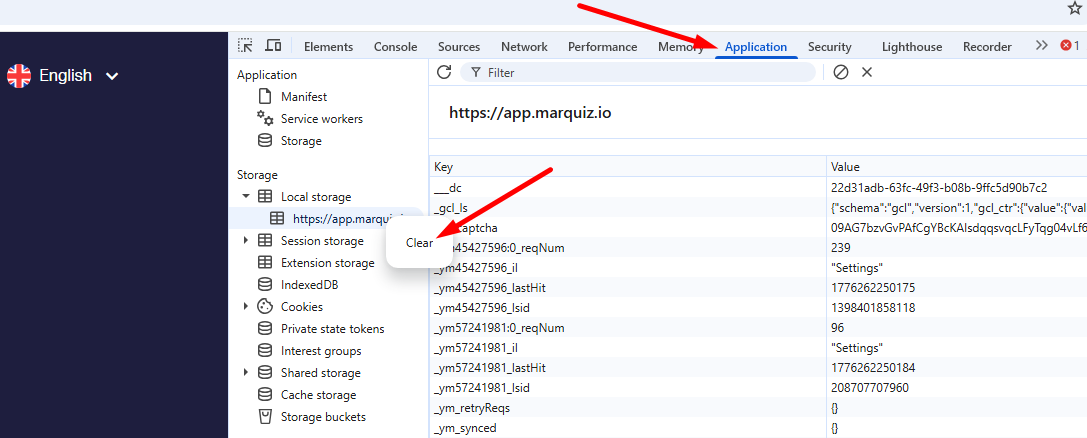
1. Press Ctrl+Shift+J
2. Go to Applications → Storage → Local Storage
3. Right-click on app.marquiz.io → Clear
4. Refresh the page (F5 or Ctrl + R)
macOS
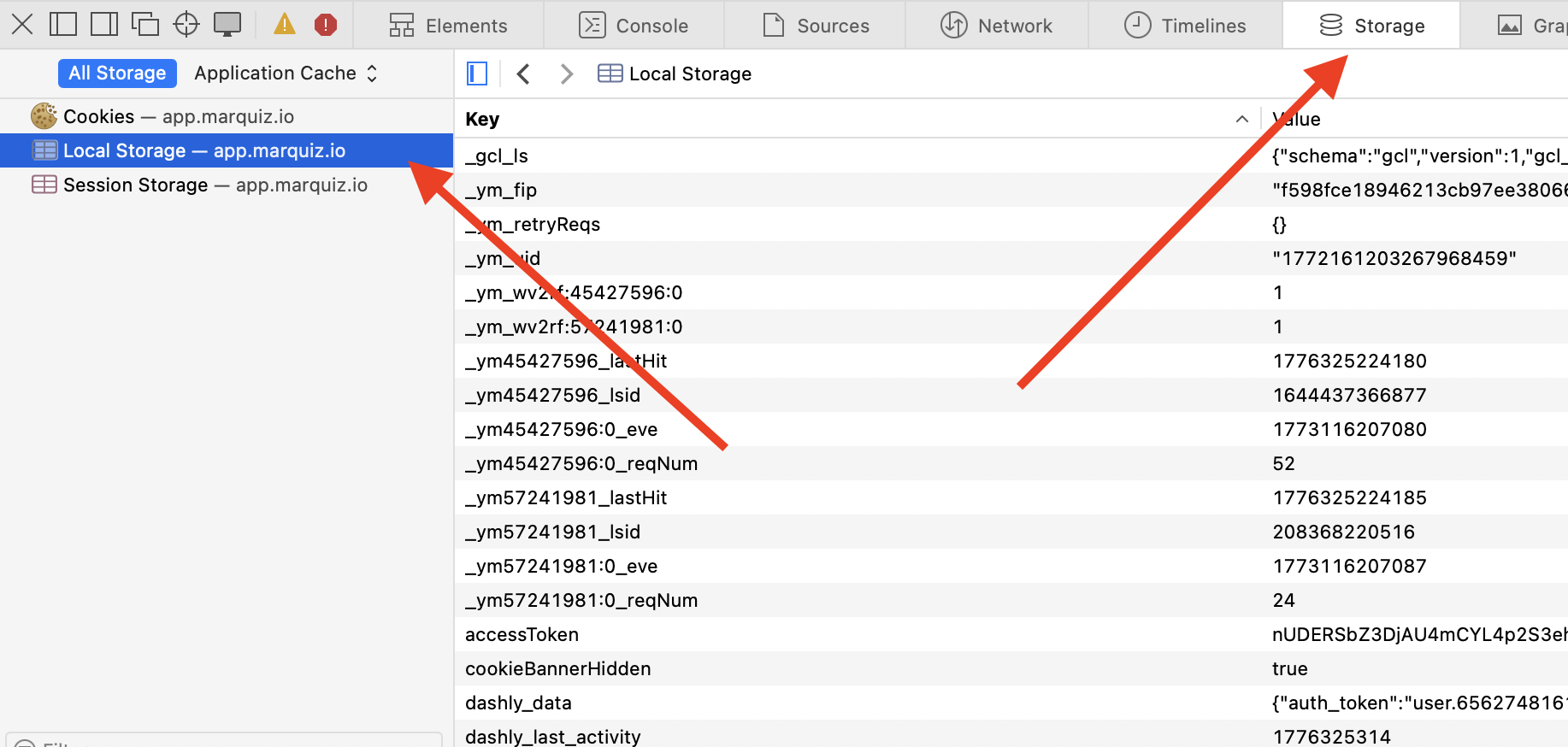
1. Press Cmd + Opt + J (in Safari — Cmd + Opt + C).
2. Go to Applications → Storage → Local Storage.
3. Right-click on app.marquiz.io → Clear.
4. Refresh the page (Cmd + R).
Result
Done. Cache and local storage are cleared — the website should work correctly.
If the issue persists, contact support.